OvO 2 — Play Free Online
More OvO Series games

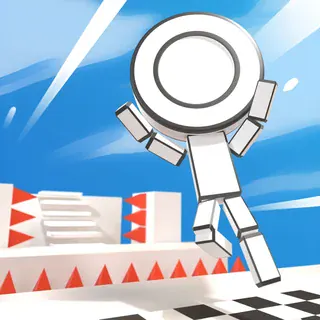






OvO 2 is the follow-up to Dedra Games' minimalist parkour platformer. You steer a small stick figure through stages made of blocks, gaps, spikes and saw blades, and every level is a short sprint from the left edge to the exit. It is really a game about momentum: the fastest route is rarely the cautious one, and each stage is short enough that you can replay it dozens of times chasing a better clock.
If you came to this site for the original OvO, the feel will be familiar. The stick-figure look, the instant restarts and the focus on movement rather than combat all carry over, with the sequel adding new levels and new moves on top. It runs in the browser with nothing to install, so a quick attempt between other things is easy.
How to play
Use the arrow keys. Left and Right run, Up jumps, and Down slides or slams. The slide is the move that separates OvO from a plain platformer: pressing Up out of a slide launches a dive, which carries you further and faster than a normal jump. Press R to restart the level instantly whenever a run goes wrong.
A typical round goes like this: read the obstacles as the level scrolls into view, pick a line, and commit to it. Missing a jump usually costs you a restart, not a life bar, so the game rewards trying an aggressive line and learning from the failure. Each stage also has a target time, so finishing is only half the goal; finishing cleanly and quickly is the other half.
Tips
- Learn the slide-then-dive combination early. Once it is second nature, it lets you cross gaps that a standing jump cannot.
- Do not stop running to think. Keep momentum and plan the next obstacle while the current one is still under your feet.
- Restart with R as soon as a run is clearly lost. A fresh attempt is faster than limping to the end of a bad one.
- Replay the same level to shave time. Small savings from smoother landings and fewer pauses add up.
Similar games on OvO
OvO and OvO Classic are the original take on the same idea, if you want to compare how the movement has grown. OvO Dimensions is another entry in the series. For a different flavour of stickman platforming, try Vex 3 or Vex 4, which lean more on obstacle courses with checkpoints, or Stickman Parkour 3 for a more trick-focused run.
OvO 2 suits short sessions on a keyboard: a few minutes at a time, one level at a time, trying to beat your own best.
Questions about OvO 2
What are the controls in OvO 2?
Left and Right arrows run, Up jumps, and Down slides or slams. Pressing Up out of a slide makes you dive. R restarts the level.
How do I restart a level in OvO 2?
Press R to restart the current level immediately.
Is OvO 2 free to play?
Yes. It plays free in your browser on ovogame.click with no download or account.
Does OvO 2 need a keyboard?
The controls are keyboard-based (arrow keys and R), so a laptop or Chromebook is the most comfortable way to play.